
Seamlessly access your Tableau data in Excel
directly from your extracts
Easy. Powerful. Secure.
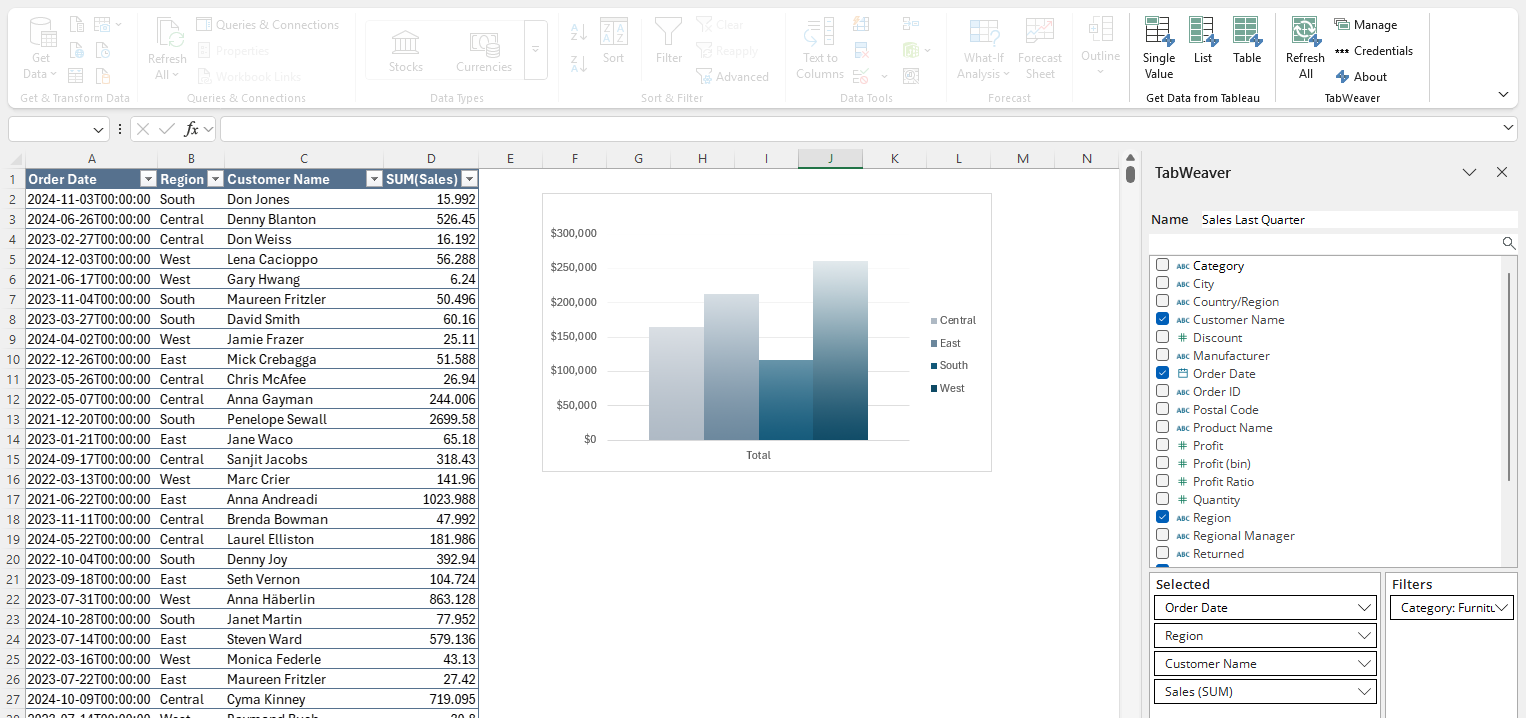
Bring data from your Tableau extracts directly into Excel. No custom dashboards or clunky exports.
✔️ Row level security
✔️ Role based access
✔️ Secure, local operation — your data stays yours
Use TabWeaver 100% free — no credit card required, no strings attached (if you're into that).
Connect to Tableau in seconds with simple, one-time setup.
Simple to use and powerful to customize — no coding necessary. Pick your fields and filter your data with an intuitive and familiar selector.
Update your data in a single click or check a box to automagically refresh your data each time a workbook opens.
Support for both Username & Password and secure Personal Access Token (PAT) authentication. Need secure SSO or OAuth? Contact our sales team for enterprise solutions.
Apply robust filters and field aggregations (SUM, MIN/MAX, AVG, and many more) just like in Tableau.
TabWeaver makes it easy whether you need a complex dataset, a simple list, or a single value. Use your data anywhere — in a table, PivotTable, Excel’s data model, or directly in a cell.
Do all this without ever leaving Excel.
The main 'thrust' is to focus on educating attendees on how to
best protect highly vulnerable business applications with
interactive panel discussions and roundtables led by subject
matter experts.
The main 'thrust' is to focus on educating attendees on how to
best protect highly vulnerable business applications with
interactive panel.


Start for free and scale with ease. Options that grow with you.
Great to try TabWeaver or for non-commercial use
✓ No time limit
✓ No credit card
✓ No catch
𐌢 Share & modify queries
Perfect for folks who need to use TabWeaver queries, not build them
✓ Refresh queries
✓ Automatic refreshes
𐌢 Build new TabWeaver queries
Billed Anually
The complete TabWeaver experience for individuals and teams
✓ Fully featured
✓ Share & modify queries
✓ Automatic refreshes
Billed Anually
See what’s included with each license to match your team’s needs.
| Features | Free | Enterprise Viewer | Unlimited |
|---|---|---|---|
| Connect Excel to Tableau Cloud extracts | ✓ | ✓ | ✓ |
| Load Tableau data to… | |||
| Tables | ✓ | ✓ | ✓ |
| PivotTables | ✓ | ✓ | ✓ |
| Direct-to-cell | ✓ | ✓ | ✓ |
| Excel Data Model | ✓ | ✓ | ✓ |
| Orchestration | |||
| Refresh self-authored queries | ✓ | ✓ | ✓ |
| Refresh co-authored queries | 𐌢 | ✓ | ✓ |
| Manual refresh | ✓ | ✓ | ✓ |
| Automatic refresh on open | 𐌢 | ✓ | ✓ |
| Security | |||
| Safe to share Excel files | ✓ | ✓ | ✓ |
| Save credentials securely to local machine | ✓ | ✓ | ✓ |
| Authentication - Username & Password | ✓ | ✓ | ✓ |
| Authentication - PAT | ✓ | ✓ | ✓ |
| Authentication - SSO & OAuth | 𐌢 | 𐌢 | Contact |
| Authoring | |||
| Create new queries | ✓ | 𐌢 | ✓ |
| Edit self-authored queries | ✓ | 𐌢 | ✓ |
| Advanced query filters | ✓ | 𐌢 | ✓ |
| Share & co-author queries | 𐌢 | 𐌢 | ✓ |
A few quick notes to make sure TabWeaver fits your workflow.
TabWeaver connects directly to your data using Tableau’s APIs. Tableau limits transactions with these APIs to:
( 100 x Your count of Creator Licenses ) / per hour
These limits apply per Tableau Cloud site. Exceeding this limit will cause TabWeaver updates to be temporarily unavailable until Tableau’s hourly API quota resets.
Just a few things we think you might want to know.
It takes 2-3 weeks to get your first blog post ready. That includes the in-depth research & creation of your monthly content ui/ux strategy that we do writing your first blog post.
It takes 2-3 weeks to get your first blog post ready. That includes the in-depth research & creation of your monthly content ui/ux strategy that we do writing your first blog post.
It takes 2-3 weeks to get your first blog post ready. That includes the in-depth research & creation of your monthly content ui/ux strategy that we do writing your first blog post.
It takes 2-3 weeks to get your first blog post ready. That includes the in-depth research & creation of your monthly content ui/ux strategy that we do writing your first blog post.
Draper, UT
USA
help@tabweaver.com
solutions@tabweaver.com
